Common problems in PDF readers#
- 01You install another reader for every deviceThe laptop, the phone, and the tablet each get their own app. Features don't match, and every one updates on its own.See the fix
- 02You leave your notes on the last deviceYou highlight a chapter and ask a question at your desk. On your phone, the file, the marks, and the chat are gone.See the fix
- 03You can barely read or annotate on your phoneThe page and the tools are a desktop layout shrunk small. You pinch to follow a sentence, and a highlight or note rarely lands where you meant.See the fix
Open anywhere, on any device#
Notesify runs in the browser, so there's nothing to install. Read at your desktop, take the laptop to class, mark up on a tablet, and review on your phone. It works the same on Windows, macOS, Linux, ChromeOS, Android and iOS, and every feature ships to every screen at once.
 Notesify
Chapter 8 · Photosynthesis
8.2 The Light Reactions
Photosynthesis happens in two stages. In the first, the light reactions capture energy from sunlight and store it in two carrier molecules, ATP and NADPH. Water molecules are split, releasing oxygen as a by-product.
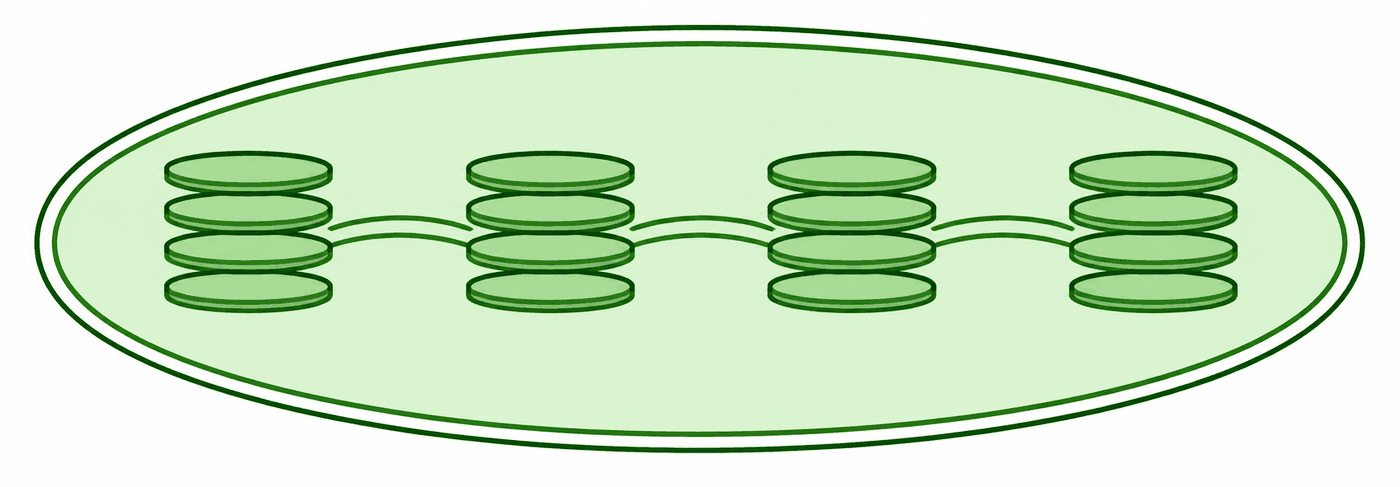
Figure 8-6 The light reactions take place in the thylakoid membranes.
Photosystem II absorbs light and energizes electrons, which pass along an electron transport chain to Photosystem I. The energy released pumps H+ ions into the thylakoid space, and ATP synthase uses their flow to make ATP.
Key terms
- Chlorophyll
- Green pigment that absorbs light energy
- Thylakoid
- Membrane sac where the light reactions occur
- NADPH
- Electron carrier used by the Calvin cycle
Think of the light reactions as a solar charger: they turn sunlight into chemical energy the plant can carry around. p. 214
- Chlorophyll absorbs light and excites electrons
- Water is split, releasing O₂
- The energy is stored in ATP and NADPH
Ask anything
Here are 5 questions on the light reactions and the Calvin cycle.
Where do the light reactions take place?
Correct!
Chlorophyll sits in the thylakoid membranes, so that's where light is captured.
Ask anything
- Windows
- macOS
- Linux
- ChromeOS
- Android
- iOS & iPadOS
The usual
A separate app per platform, each with its own features and update cycle.
In Notesify
One app in the browser. Updates land everywhere at once.
Synced across all your devices#
Everything you do saves to your account the moment you do it: the files you add, the passages you highlight, the notes you write in the margin, and every conversation with AI. Nothing to sync manually.
NotesifyChapter 8 · Photosynthesis
8.2 The Light Reactions
In the first stage, the light reactions capture energy from sunlight and store it in ATP and NADPH.
↑ on the thylakoids!
Think of them as a solar charger: sunlight becomes chemical energy, stored as ATP and NADPH. p. 214
- Chlorophyll absorbs light
- Water is split, releasing O₂
- Energy is stored in ATP
Recent
The usual
Work saved on the device you made it on. Switch screens and it's missing.
In Notesify
Everything lives in your account, so every device sees the same thing.
Made for tablets and phones#
On your phone or tablet, highlighting, drawing a note, and asking AI about the page are smooth to do. Long-press a passage to highlight it. Write with a finger or a stylus and strokes are smoothed as you draw, so the note stays legible.
Chapter 8 · Photosynthesis
8.2 The Light Reactions
In the first stage, the light reactions capture energy from sunlight and store it in ATP and NADPH.
↑ on the thylakoids!
At a glance#
| Feature | Typical reader | Notesify |
|---|---|---|
| Work on every device and system | No | Yes |
| Same features on every device | Sometimes | Yes |
| Files, highlights, and chats synced across devices | Sometimes | Yes |
| Highlight, draw, and ask on a phone or tablet | Sometimes | Yes |
Sometimes Varies by app or platform
FAQ#
No. Notesify runs in any modern browser on Windows, macOS, Linux, ChromeOS, Android and iOS, on desktops, laptops, tablets and phones. Sign in and your library is there.
Yes. Highlights and pen strokes save to your account as you make them, so they show up on every device you sign in to.
Yes. Chats are saved to your account. Open chat history on any device and pick up the thread where you left it.
Yes. Draw with either on phones and tablets. Strokes are smoothed as you draw, and long-press selects text.